InkyBay DocsInkyBay Docs
Submit a Ticket
shopify app store
  • Visit InkyBay Website
  • Privacy Policy
  • Terms of Service
  • FAQs
  • Tutorials

© 2026 InkyBay. All rights reserved.

Powered by

ParseLab, LLC
  • category-iconGetting Started
  • category-iconProducts
  • category-iconDesigns
  • category-iconTemplates
  • category-iconConfiguration
  • category-iconPrinting
  • category-iconOrders
  • category-iconInventory Management
  • category-iconSettings
  • category-iconPackages
  • category-iconUninstallation
  • category-iconTutorials
  • category-iconFAQ
Category
  • category-iconGetting Started
  • category-iconProducts
  • category-iconDesigns
  • category-iconTemplates
  • category-iconConfiguration
  • category-iconPrinting
  • category-iconOrders
  • category-iconInventory Management
  • category-iconSettings
  • category-iconPackages
  • category-iconUninstallation
  • category-iconTutorials
  • category-iconFAQ
FAQ-icon FAQ
1 min to read
Last Update on 13 May 2026

How can I restrict/limit cliparts based on printing type?

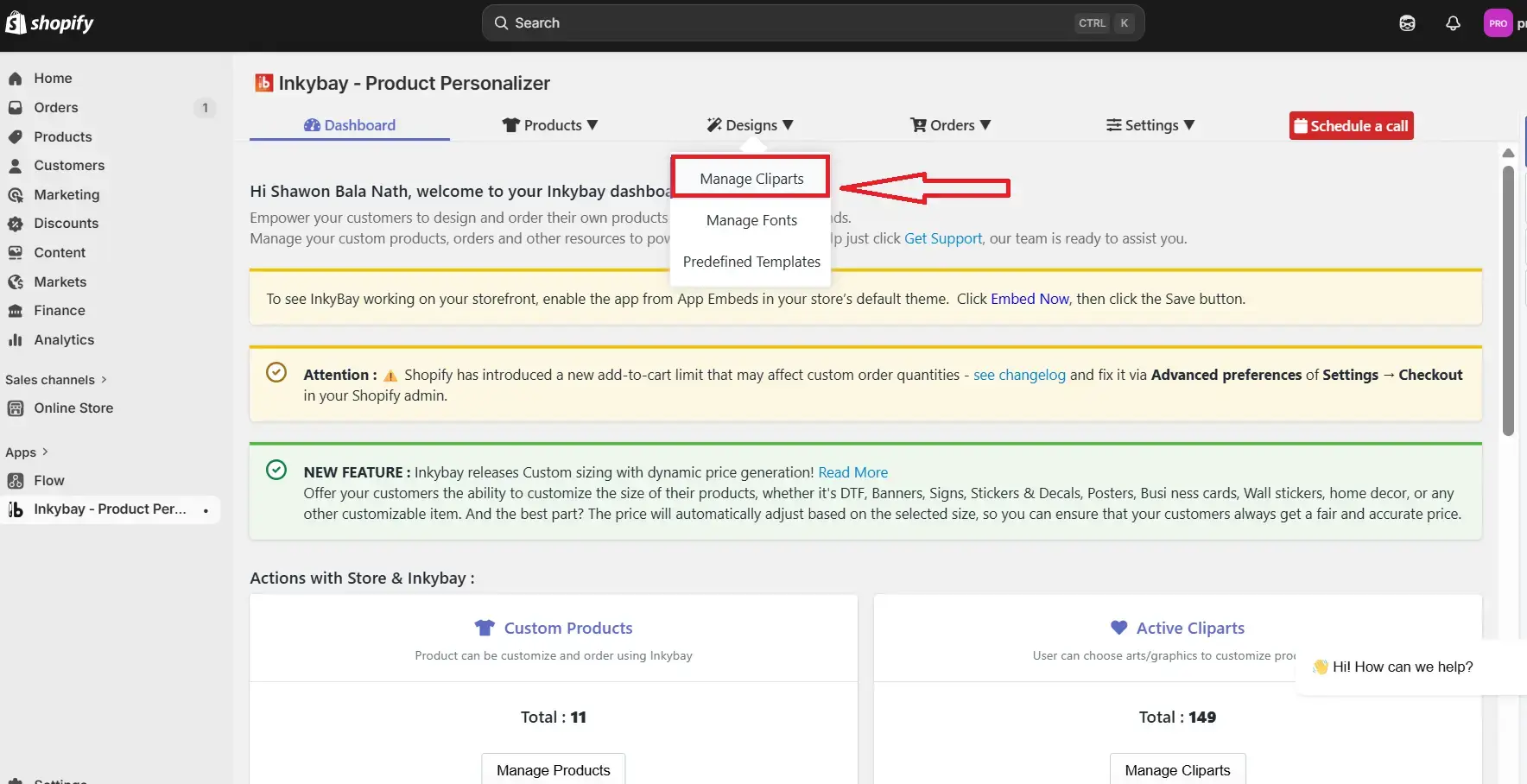
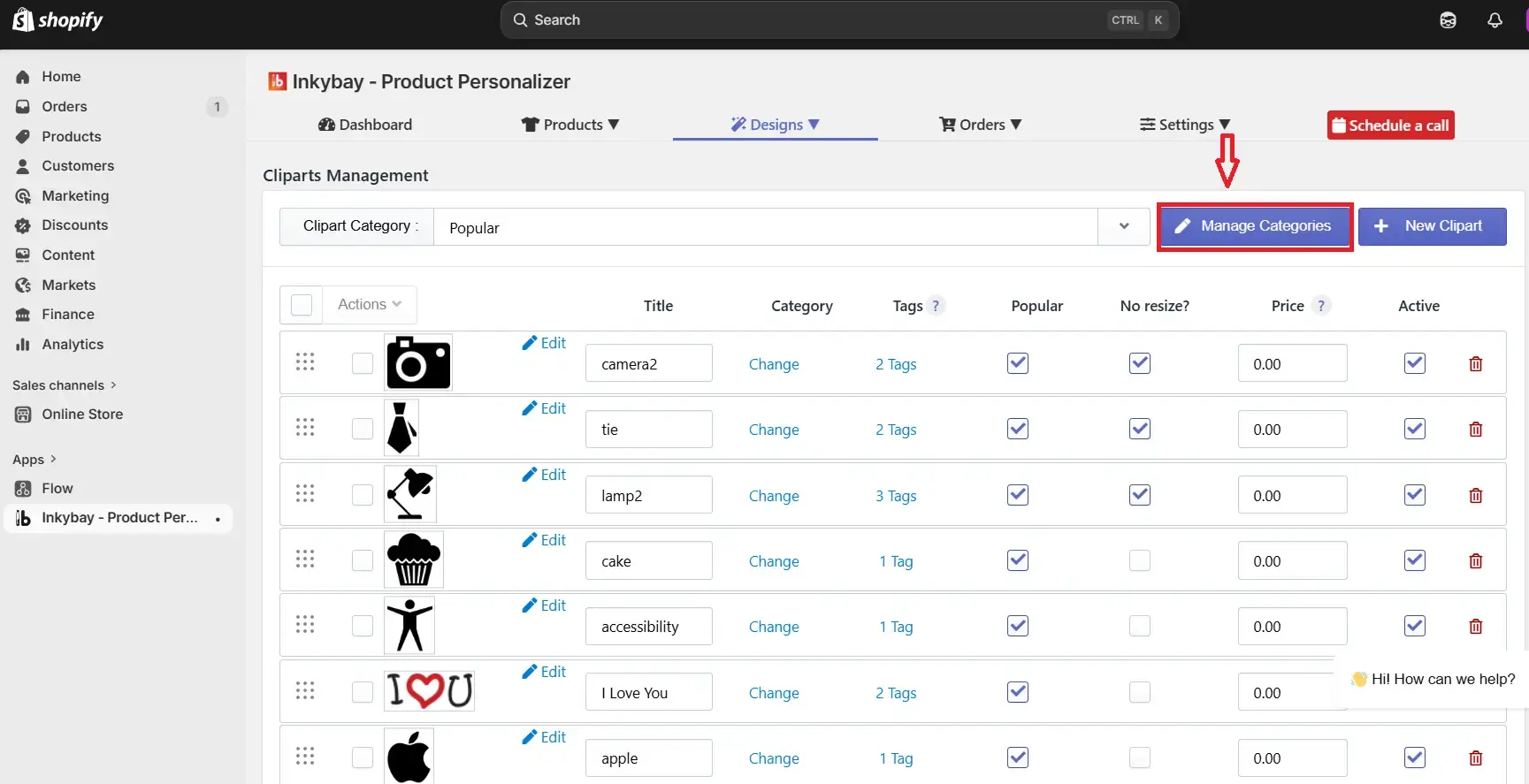
To restrict/limit cliparts based on printing types, go to InkyBay’s Designs >> Manage Cliparts. After that, click the Manage Categories. For more details, check out the tutorial. Or, follow the instructions below:


Step 1: Navigate to the Inkybay app admin, hover on “Designs” and select “Manage Cliparts”.

Step 2: Now, click on “Manage Categories”.

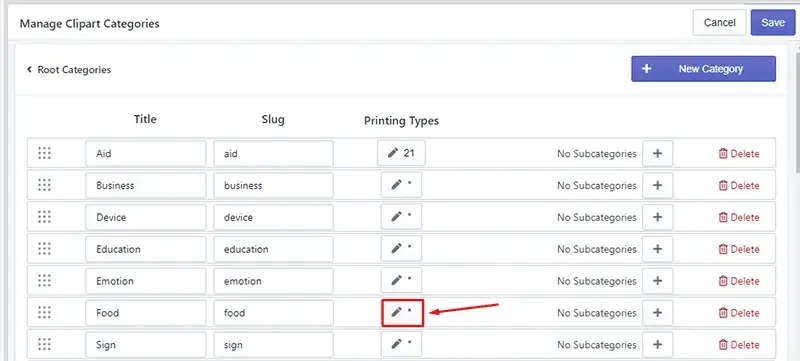
Step 3: Now, click the Edit icon under the Printing Types that you want to restrict. For example, “Food.”
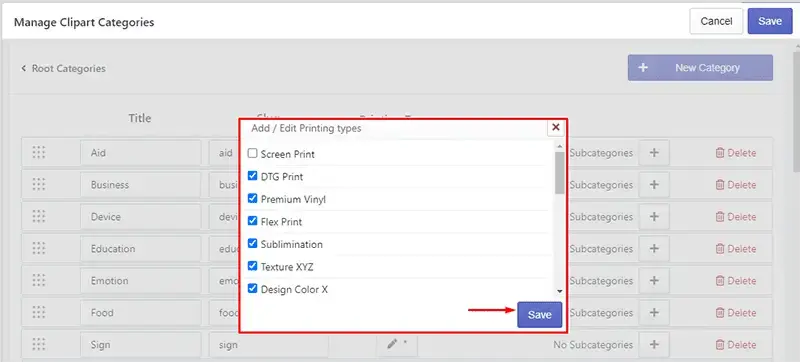
Step 4: Select the print types that you want to keep and deselect those that you want to restrict. After that, click the Save button. 
🎯Note: 

If no printing type is selected, it’ll work for all printing types.  


Step 5: Click the Save button within “Manage Clipart Categories” to update categories. 


Now, if you go to a design lab page, then that clipart category will work based on your printing types.

Did this post help you?
Previous article
How does InkyBay calculate customized products?
Next article

How can I set up my products where customers only pay for the side that they edited on?

Related Articles

  • Can I customize the title of the design tool page?
  • How can I set up my products where customers only pay for the side that they edited on?
  • How can I improve InkyBay's loading speed on the product page?
  • How can I apply discounts (via third-party apps) to customized products in Shopify?
  • How can I change the “Get a Quote” contact form information?
  • How do I upload a custom-shaped print area?
  • How can I set a default font for my design tool when customers add custom text?
  • How can I allow different color choices for the front and back sides?
  • Can I set minimum order quantities with your app?
  • Who will fulfill our orders?
  • Why do I get a 404 error after clicking the “Customize It” button?
  • “Customize It” button loading delay on the product page. How can I make it faster?
  • What is InkyBay’s storage limit, and what does it include?
  • Why every time a customer designs a product and add to cart, the design is being saved as a new product in my store?
  • How does InkyBay calculate customized products?
  • Is there any order limit in InkyBay?
  • Do you offer Print-on-demand (POD) services?

Related Articles

  • Can I customize the title of the design tool page?
  • How can I set up my products where customers only pay for the side that they edited on?
  • How can I improve InkyBay's loading speed on the product page?
  • How can I apply discounts (via third-party apps) to customized products in Shopify?
  • How can I change the “Get a Quote” contact form information?
  • How do I upload a custom-shaped print area?
  • How can I set a default font for my design tool when customers add custom text?
  • How can I allow different color choices for the front and back sides?
  • Can I set minimum order quantities with your app?
  • Who will fulfill our orders?
  • Why do I get a 404 error after clicking the “Customize It” button?
  • “Customize It” button loading delay on the product page. How can I make it faster?
  • What is InkyBay’s storage limit, and what does it include?
  • Why every time a customer designs a product and add to cart, the design is being saved as a new product in my store?
  • How does InkyBay calculate customized products?
  • Is there any order limit in InkyBay?
  • Do you offer Print-on-demand (POD) services?