InkyBay DocsInkyBay Docs
Submit a Ticket
shopify app store
  • Visit InkyBay Website
  • Privacy Policy
  • Terms of Service

© 2026 InkyBay. All rights reserved.

Powered by

ParseLab, LLC
  • category-iconGetting Started
  • category-iconProducts
  • category-iconDesigns
  • category-iconTemplates
  • category-iconConfiguration
  • category-iconPrinting
  • category-iconOrders
  • category-iconInventory Management
  • category-iconSettings
  • category-iconPackages
  • category-iconUninstallation
  • category-iconTutorials
  • category-iconFAQ
Category
  • category-iconGetting Started
  • category-iconProducts
  • category-iconDesigns
  • category-iconTemplates
  • category-iconConfiguration
  • category-iconPrinting
  • category-iconOrders
  • category-iconInventory Management
  • category-iconSettings
  • category-iconPackages
  • category-iconUninstallation
  • category-iconTutorials
  • category-iconFAQ
FAQ-icon FAQ
1 min to read
Last Update on 05 May 2026

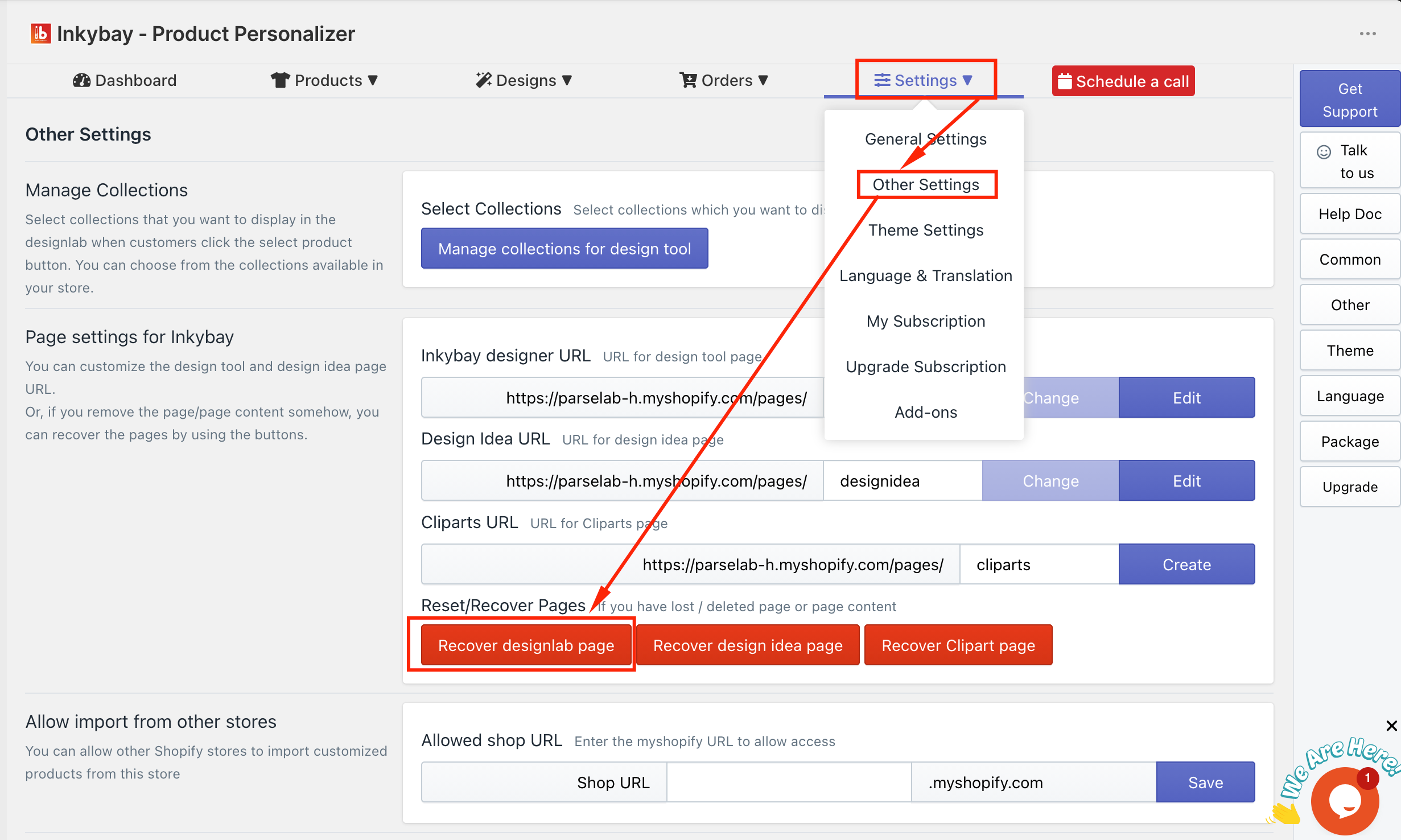
Why do I get a 404 error after clicking the “Customize It” button?

This happens when you remove the app-created DesignLab page from your Shopify page list. However, to resolve this error, navigate to Settings > Other Settings. After that, click on “Recover designlab page” as shown in the image below:


Did this post help you?
Previous article
“Customize It” button loading delay on the product page. How can I make it faster?

Related Articles

  • Who will fulfill our orders?
  • Do you offer Print-on-demand (POD) services?
  • “Customize It” button loading delay on the product page. How can I make it faster?
  • How can I allow different color choices for the front and back sides?
  • How can I restrict/limit cliparts based on printing type?
  • How do I upload a custom-shaped print area?
  • How can I change the “Get a Quote” contact form information?
  • How can I apply discounts (via third-party apps) to customized products in Shopify?
  • Is there any order limit in InkyBay?
  • How does InkyBay calculate customized products?
  • Why every time a customer designs a product and add to cart, the design is being saved as a new product in my store?
  • What is InkyBay’s storage limit, and what does it include?
  • Can I customize the title of the design tool page?
  • Can I set minimum order quantities with your app?
  • How can I set a default font for my design tool when customers add custom text?
  • How can I set up my products where customers only pay for the side that they edited on?
  • How can I improve InkyBay's loading speed on the product page?

Related Articles

  • Who will fulfill our orders?
  • Do you offer Print-on-demand (POD) services?
  • “Customize It” button loading delay on the product page. How can I make it faster?
  • How can I allow different color choices for the front and back sides?
  • How can I restrict/limit cliparts based on printing type?
  • How do I upload a custom-shaped print area?
  • How can I change the “Get a Quote” contact form information?
  • How can I apply discounts (via third-party apps) to customized products in Shopify?
  • Is there any order limit in InkyBay?
  • How does InkyBay calculate customized products?
  • Why every time a customer designs a product and add to cart, the design is being saved as a new product in my store?
  • What is InkyBay’s storage limit, and what does it include?
  • Can I customize the title of the design tool page?
  • Can I set minimum order quantities with your app?
  • How can I set a default font for my design tool when customers add custom text?
  • How can I set up my products where customers only pay for the side that they edited on?
  • How can I improve InkyBay's loading speed on the product page?