This happens because InkyBay loads via Shopify script tags, which are triggered after the rest of your page finishes loading. And Inkybay doesn’t add any code to your theme's liquid file to ensure smooth installation.
However, you can resolve this issue by adding the script below to your product page liquid file. It’ll not affect any of your store’s functionality.
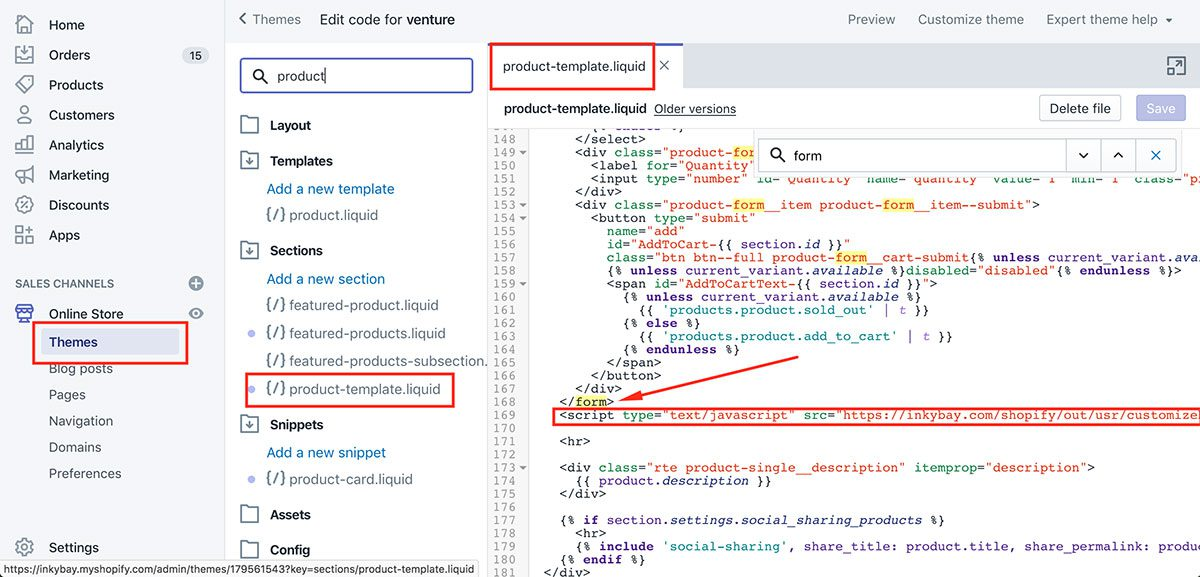
Edit your product page or product form liquid file. The file may vary depending on your active theme. Just find the right product form (add to cart) template.
Copy the script below and change [STORE] to your store alias (store URL).
Add the script below after the end of the add to cart form tag [ </form> ] or [{% endform %}]
If you want to move the Customize It button, place this div tag where you want to show (before/outside of the product form tag): <div id=” EFOLI_DESIGNER_CUSTOMIZE_IT_BUTTON_PLACE”></div>
 Getting Started
 Products
 Designs
 Templates
 Configuration
 Printing
 Orders
 Inventory Management
 Settings
 Packages
 Uninstallation
 Tutorials
 FAQ
FAQ